

Overview
In modern software development, maintaining a structured and efficient version control system is essential for delivering scalable and high-quality applications. GitHub has become the industry standard for managing code, enabling collaboration, and ensuring seamless deployment workflows.
For a web development company in Kannur, adopting GitHub best practices is critical to building scalable web applications, mobile app solutions, and secure digital platforms. A well-defined workflow not only improves development speed but also ensures consistency and long-term maintainability across projects.
The Importance of a Structured GitHub Workflow
A structured GitHub workflow enables development teams to manage complex projects with clarity and precision. Without proper processes, codebases can quickly become disorganized, leading to inefficiencies and increased risk of errors.
By implementing standardized practices such as branch management, regular commits, code reviews, and controlled merging, organizations can maintain clean repositories and improve collaboration. This approach is particularly valuable for companies offering website development services in Kannur, custom web development, and enterprise software solutions.
Standard Daily GitHub Workflow in Professional Teams
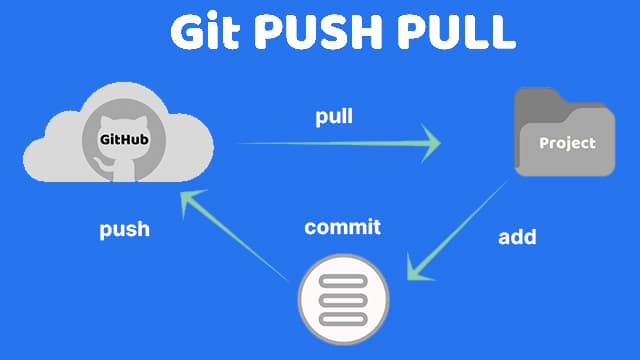
Professional development teams follow a consistent daily workflow to ensure code stability and productivity. The process begins with checking the repository status and updating the local environment with the latest changes.
git status
git pull origin develop
Developers then create a dedicated branch for their assigned task, ensuring that development activities remain isolated and do not impact the main codebase.
git checkout -b feature/module-nameDuring development, changes are staged and committed with clear and descriptive messages to maintain transparency and traceability.
git add .
git commit -m "Implemented feature with validation and API integration"
Once the work is complete, the changes are pushed to the remote repository.
git push origin feature/module-nameThis structured approach ensures that all development activities are properly tracked and managed.
Branching Strategy for Scalable Development
A well-defined branching strategy is essential for managing multiple development activities simultaneously. Professional teams typically use a structured model consisting of main, develop, feature, bugfix, and hotfix branches.
The main branch represents production-ready code, while the develop branch is used for ongoing development. Feature branches are created for implementing new functionalities, and bugfix or hotfix branches handle issue resolution.
This strategy allows teams to work independently while maintaining the stability of the production environment, making it ideal for scalable web applications and enterprise-level systems.
Pull Request and Code Review Process
Pull requests are a critical component of collaborative development. Once a feature is completed and pushed to the repository, a pull request is created to merge the changes into the develop branch.
This process allows team members to review the code, provide feedback, and ensure that coding standards are followed. Code reviews help identify potential issues early and improve overall code quality.
Before merging, developers should ensure that their branch is updated with the latest changes to avoid conflicts.
git pull origin developThe pull request workflow ensures that only tested and approved code is integrated into the main codebase.
Merge Strategy and Release Management
Merging is the process of integrating changes from one branch into another. After approval, feature branches are merged into the develop branch, where integration testing is performed.
git checkout develop
git pull origin develop
git merge feature/module-name
Once all features are tested and stable, the develop branch is merged into the main branch for production release.
git checkout main
git merge develop
This controlled merge strategy ensures reliable deployments and minimizes the risk of errors in production environments.
Efficient Use of Git Stash in Development
In real-world scenarios, developers often need to switch tasks without committing incomplete work. Git stash provides a flexible solution by temporarily saving uncommitted changes.
git stashThis allows developers to switch branches and address urgent tasks without losing progress. When ready to resume work, the changes can be restored.
git stash applyTo apply and remove the stash simultaneously:
git stash popThe use of stash improves workflow flexibility and helps maintain a clean commit history.
Code Management and Commit Best Practices
Consistent and meaningful commits are essential for maintaining a clear project history. Developers should commit changes frequently with descriptive messages that explain the purpose of the update.
This practice improves collaboration, simplifies debugging, and ensures that project progress is easily traceable. Avoiding vague commit messages and maintaining consistency across teams is a key aspect of professional development.
Stack-Oriented Project Architecture
Modern applications are best organized using a stack-oriented architecture. Projects are divided into distinct layers such as frontend, backend, mobile, database, and DevOps.
Frontend technologies like React or Next.js are used to build responsive interfaces, backend frameworks such as Laravel or Node.js manage business logic, and mobile applications are developed using Flutter or React Native.
This separation of concerns improves scalability, enhances maintainability, and allows teams to work efficiently across different modules.
Automation and Continuous Integration
Automation is a fundamental aspect of modern development workflows. GitHub Actions enables teams to implement continuous integration and deployment pipelines, automate testing procedures, and streamline release processes.
By automating repetitive tasks, organizations can improve efficiency, reduce errors, and deliver high-quality applications faster.
Security and Access Control
Maintaining security within GitHub is essential for protecting sensitive data and ensuring system integrity. Developers should avoid committing confidential information such as API keys and environment variables.
Implementing access control, enabling security alerts, and following best practices for secure coding help safeguard the codebase and build reliable applications.
Business Impact of GitHub Best Practices
For organizations providing SEO services in Kannur, digital marketing, and application development, implementing GitHub best practices offers significant advantages. It improves development efficiency, enhances collaboration, and ensures consistent delivery of high-quality solutions.
A structured workflow also enables faster project completion, better client satisfaction, and long-term business growth.
Conclusion
Adopting GitHub best practices, including structured workflows, branching strategies, pull requests, merging processes, and efficient command usage, is essential for modern development teams. These practices enable organizations to build scalable, secure, and high-performance applications while maintaining consistency and quality.
For any web development company in Kannur, following these standards is key to delivering reliable and successful digital solutions.